
If you’ve ever had a client call to tell you their website is down before you knew about it yourself, you’ll understand why we built UptimeMonkey.
At Blue Kelpie, we manage a portfolio of client websites across WordPress, WooCommerce, and custom builds. Unexpected downtime can have lasting impacts for clients, and for us. Lost customers, lost reputation and lost income. It’s a pretty crappy outcome! If you see a site down will you go back?
We used third-party monitoring tools, but they were either too expensive for small agencies, too limited on free plans, or missing features we actually needed.
So we built our own. And then we turned it into a product.
What is website uptime monitoring?
Uptime monitoring is the practice of automatically checking whether your website is online and responding correctly at regular intervals. When something goes wrong such as a server crash, a failed plugin update, a hosting outage or, a broken SSL certificate, a monitoring tool detects it immediately and alerts you.
A good uptime monitor checks for:
- HTTP errors: 500, 502, 503, 504 server errors that mean something has broken on the backend
- 404 errors: pages that no longer exist, which can indicate a migration gone wrong or a misconfigured redirect
- Connection failures: DNS errors, timeouts, or SSL failures that prevent the page from loading entirely
- Response time: a slow site isn’t necessarily down, but a sudden spike in response time often precedes an outage
Why we built UptimeMonkey
Managing client websites is core to what we do at Blue Kelpie. Over the years we’ve had our share of middle-of-the-night hosting failures, WooCommerce checkout pages going down on weekends, and WordPress updates breaking things silently.
The monitoring tools we tried fell into two camps: enterprise platforms priced for large teams, or free tools so limited they weren’t useful. There just wasn’t a good fit for us managing a handful of client sites.
We wanted something that:
- Checked sites every 1–15 minutes depending on criticality
- Sent immediate email alerts when something broke
- Supported SMS alerts for mission critical website
- Kept 30 days of uptime history and response time logs
- Was priced for small businesses, and had the ability to scale affordably
Well, we knew what we wanted but we just couldn’t find it. So, we built our own.
The build: a full Saas from scratch
Building UptimeMonkey was as much a technical exercise as it was a product decision. Turns out, it was also a great learning exercise too!
We developed the entire platform ourselves. Starting with a solid infrastructure we built our way through to the simple, user-friendly front-end.
The stack:
- Node.js and Express for the backend API and server
- SQLite for the database (lightweight, fast, and perfect for a self-hosted SaaS at this scale)
- EJS templating for server-rendered pages with shared partials and components
- Stripe for subscription billing and one-time SMS credit purchases. No payments occur on the site itself so we didn’t need an additional security layer for commerce
- Twilio for SMS alert delivery
- Let’s Encrypt for SSL on both the marketing site and the app subdomain
- nginx as a reverse proxy on a dedicated VPS. We went with Ionos.
The monitoring engine runs on a cron schedule, checking each site at intervals appropriate to the user’s plan. This starts at every 15 minutes on the trial, down to every 60 seconds on the Business plan.
We built a proper multi-user system with admin controls, a beta tester management panel, trial expiry lockouts, and webhook-driven plan updates via Stripe. Every design and UX decision was made with web agencies in mind. Turns out we’re our own ideal customer!
What UptimeMonkey does
UptimeMonkey monitors your websites 24 hours a day, 7 days a week, and alerts you the moment something breaks.
Email alerts fire immediately when a monitored site returns a 5xx error, a 404, or a connection failure. You also get a recovery alert when the site comes back up. That way you always know the full timeline of an incident.
SMS alerts are available as a credit add-on. You set a repeat frequency per site. Options are, once only, every 15 minutes or, every hour.
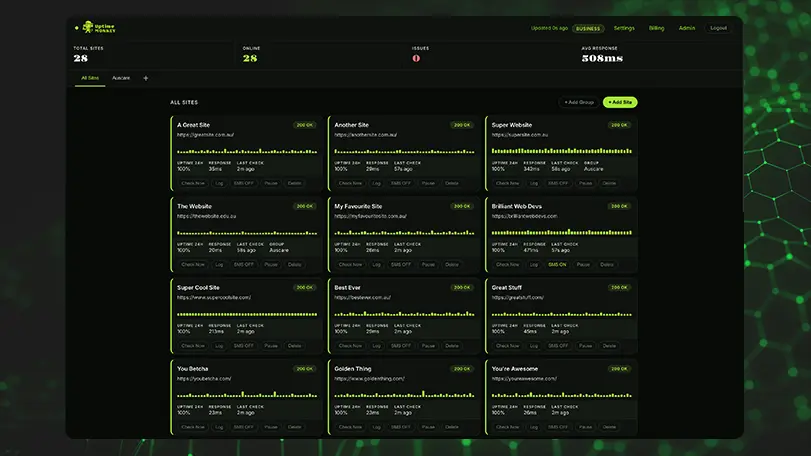
The dashboard gives you a clean view of all your monitored sites, with sparkline charts showing response time history, uptime percentage over the last 24 hours, and a 30-day log for every site.
Site groups let you organise monitoring by client, project, or environment. If you’re managing sites for multiple businesses, the groups keep everything tidy.
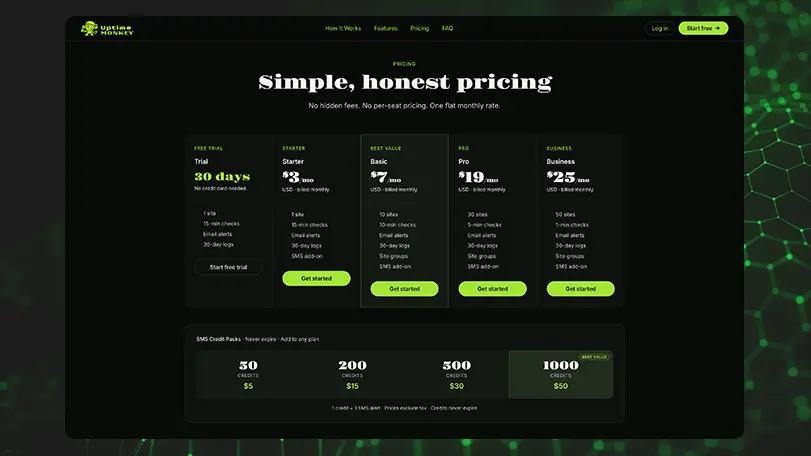
Plans start at $3 USD per month for a single site. The Basic plan at $7 covers 10 sites with 10-minute checks, which suits most small agencies. There’s a 30-day free trial with no credit card required. Super affordable for all website owners.
Why website monitoring matters for small businesses
Most small business websites don’t have a dedicated team watching them around the clock. A Monday morning outage that started Saturday evening might go unnoticed for 36 hours. Earlier this year we had a client site down for seven hours. We discovered it from a notification for a failed SEO scan. If that was an e-commerce site, that’s potentially thousands of dollars in lost revenue. For a service business, it’s lost leads, lost business and lost revenue.
Google also factors uptime into how it views your site. Frequent outages or slow response times can hurt your search rankings over time. If Googlebot encounters errors when crawling your pages you can end up disappearing into the SERP void and, this can take time and money to recover from. $3/mth is looking pretty good right now!
For agencies managing client websites, uptime monitoring is a value-add that clients notice. Being the first to know about an outage, and having the data to show exactly when it started and how long it lasted, is so much better than getting a panicked call from the client.
Lessons From Building a SaaS Product
Building UptimeMonkey was a genuine learning exercise in full-stack product development. A few things stood out:
Webhooks are everything in payments. Stripe’s checkout flow is straightforward, but the real logic lives in the webhook handler. Getting plan updates, subscription status, and SMS credit purchases to flow correctly through webhook events took careful testing and iteration.
Session persistence matters more than you think. We switched from in-memory sessions to a file-based session store early on. Every service restart was logging users out, obviously not ideal for a monitoring dashboard people keep open all day.
Toll-free SMS verification takes time. Twilio’s toll-free number verification for A2P messaging is strict and takes several business days. Plan for it early if SMS is a core feature of what you’re building. In fact it took us about two weeks!
Keep the database simple. SQLite turned out to be the right choice for this scale. No separate database server to manage, no connection pooling to configure, and backups are just file copies.
Ready to try UptimeMonkey
If you’re running a website, or managing websites for clients, uptime monitoring isn’t optional. It will save the embarrassment of hearing about website downtime from someone else.
UptimeMonkey is live at uptimemonkey.io. The 30-day free trial requires no credit card, and plans start at just $3 (USD) per month.
If you’re a Blue Kelpie client and you’d like us to set up monitoring for your site as part of your ongoing support, get in touch.